What happens when you run a docker container? Link to heading
This looks very simple command but there is a lot happening under the hood when you run a docker container. Let’s break it down step by step.
FYI: I won’t be deep diviing into internals of docker daemon, containerd, cgroups or networking. I will just give you a high-level overview of what happens when you run a docker container.
As a simple example, let’s say you run the following command:
You want to run “Hello, World” container using the following command:
Docker CLI vs Docker Daemon Link to heading
- Docker has docker cli which interacts with docker daemon.
- Docker daemon is responsible for managing containers, images, networks, and volumes and docker daemon uses containerd to manage the lifecycle of containers.
Docker Run Command Link to heading
docker run hello-world
- Docker CLI sends a request to the Docker daemon to run the container.
- Docker daemon checks if the image exists locally; if not, it pulls from Docker Hub and stores it.
- It sets up isolation using Linux namespaces and cgroups, configures networking, and starts the container process (ENTRYPOINT or CMD).
Let’s Inspect Link to heading
when you run docker run hello-world
- docker cli sends a request to docker daemon via (REST API) to run the container.
- Docker daemon checks if the container image exists locally; if not, it tries to pull the image from Docker Hub, which is the default registry, and stores it locally on your host machine.
- Image pulling is done from specified registry (Docker Hub by default) and it checks for the image.
- Once the image is pulled and exists, it tries to create a new container from that image.
- containerd (which is a container runtime) is responsible for managing the lifecycle of containers and it creates a new container from the image.
The Container Setup Includes
- Container File System
- Container Networking Setup/Interfaces
- Namespaces and Cgroups for isolation
Advance: containerd delegates the container setup to runc which is a low-level container runtime using a shim process. runc is responsible for setting up the container’s namespaces, cgroups, and other isolation mechanisms. It also starts the container process (ENTRYPOINT or CMD) inside the container.
- Once container is created and started, the process inside the container runs and produces output. In this case, it prints “Hello from Docker!” to the console.
Analogies
Analogy-1:
- Thing about image as a blueprint and container as a running instance of that blueprint.
Analogy-2: Car Tyres Machine
- Where machine is image and tyre is container and same machine can produce multiple tyres but each tyre is a separate instance of that machine.
FYI:
- There is alot going underthe hood when you run a docker container like namespaces, cgroups, networking etc but scope of this article is to give you a high-level overview of what happens when you run a docker container.
Output: Link to heading
docker run hello-world command does the following:
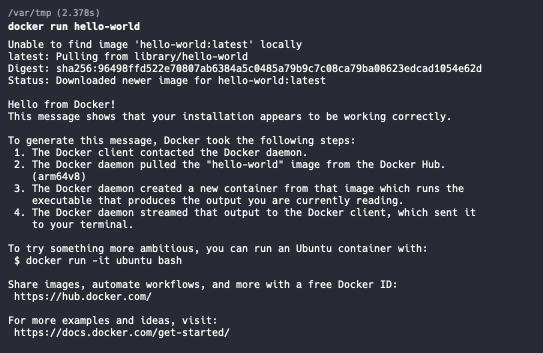
Summary:
flowchart TD
    A["docker run hello-world"]
    A --> B["Docker CLI"]
    B --> C["Docker Daemon"]
    C --> D{"Image exists?"}
    D -->|No| E["Pull image"]
    E --> F["Create Container"]
    D -->|Yes| F
    F --> G["Setup isolation<br/>Namespaces • Cgroups • Network"]
    G --> H["Start Process"]
    H --> I["Running"]

    classDef input fill:#1e88e5,stroke:#1565c0,stroke-width:2px,color:#fff
    classDef daemon fill:#f57c00,stroke:#e65100,stroke-width:2px,color:#fff
    classDef decision fill:#fbc02d,stroke:#f9a825,stroke-width:2px,color:#000
    classDef process fill:#43a047,stroke:#2e7d32,stroke-width:2px,color:#fff
    classDef output fill:#00897b,stroke:#00695c,stroke-width:2px,color:#fff

    class A,B input
    class C daemon
    class D decision
    class E,F,G,H process
    class I output

    linkStyle 3 stroke:#f57c00,stroke-width:2px
    linkStyle 5 stroke:#43a047,stroke-width:2px
Commands Link to heading
- docker images
- docker run hello-worldi